Convert Apple Loops to WAV in Logic Pro
LoopToWav
Apple Loops → tempo-matched WAV, ready to drag into your sampler.
An Audio Unit for Logic Pro that converts Apple Loops into WAV files matched to your project's tempo — and to a new key, if you want.
$15 launch price until Nov 10. · $19$19 · One-time purchase
- Audio Unit · macOS 11+
- Logic Pro & GarageBand
- 24 / 16-bit WAV
Use Logic's loops in any sampler
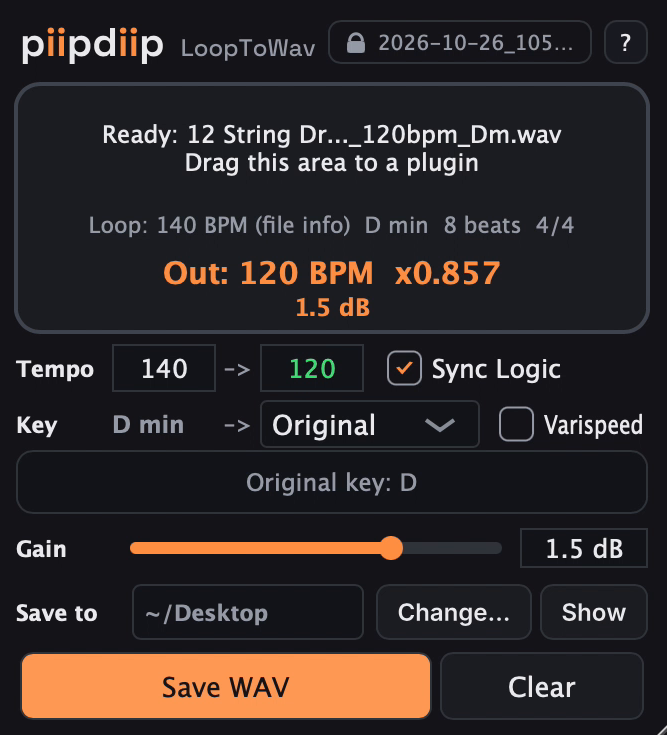
Some samplers won't accept Apple Loops. LoopToWav converts them into WAV files matched to your Logic project's tempo, and to a new key if you want, so you can drag them straight into your sampler.
It's a way to use Logic's free loop library in Serum, Kontakt or granular plugins, without paying for sample subscriptions.
How it works
- 1
Drop
Drop an Apple Loop onto LoopToWav.
- 2
Match
It follows Logic's tempo. Pick a key if you want one.
- 3
Drag
Drag the WAV from the drop zone into your sampler, or save it to a folder.
Features
Follows Logic's tempo
Or set your own target BPM: drag the field up or down, or double-click to type.
Key shift
Transposes by the shortest distance. Change the key from the menu, or by scrolling over it.
Tape-style Varispeed
Change speed and pitch together, like slowing down a tape.
Audio and instrument loops
Works with both audio (blue) and software instrument (green) Apple Loops.
Reads loop information
Tempo, key, beat count and time signature, straight from the Apple Loop file.
24-bit or 16-bit WAV
Choose 16-bit for smaller files.
A folder for each project
Dragged WAVs are kept, never deleted or overwritten, so your samplers can find them when you reopen the project.
Shared folder
An optional shared folder for loops you reuse across projects.
Many file types
Accepts .caf, .aif, .aiff, .wav, .m4a and .mp3, up to 2 minutes.
Stays responsive
Conversion runs in the background, so the window doesn't freeze with longer loops.
Clear file names
Tempo, key, Varispeed, gain and bit depth appear in the name, so versions are easy to tell apart.
5 skins, English or Japanese
Help tooltips in English or Japanese.
Watch it work
Requirements and compatibility
- System
- macOS 11.0 or later
- Format
- Audio Unit (instrument). Designed for Logic Pro; also works in GarageBand.
- Notarization
- LoopToWav isn't notarized by Apple yet. If macOS blocks it at first, the installation guide shows how to allow it.
Installation guide
The full guide is a PDF, so you can read it before you buy. It covers installation, every control, and how dragged WAVs are stored and cleaned up.
FAQ
Why not use Apple Loops directly in my sampler?
Some samplers can't read Apple's loop format, and even those that can keep the loop at its original tempo. LoopToWav hands your sampler an ordinary WAV that already matches your project.
Which samplers does it work with?
LoopToWav gives you a normal WAV file, so it should work with any sampler that accepts WAV files dragged in.
Where do the WAV files go? Will my project still play when I reopen it?
Dragged WAVs are copied into a folder for each project, under a LoopToWav Used folder (in Application Support by default). LoopToWav never deletes or overwrites them, because samplers remember where their files are. The guide explains how to clean up folders you no longer need.
Can I move or share a project?
To move a project to another Mac, copy its WAV folder along with it (your sampler may ask you to locate the files). To share a project with someone else, bounce or export the sampler tracks as audio, as with any samples loaded into a third-party sampler.
Does it work in GarageBand?
Yes. I've tested it with GarageBand 10.4.11.
Does it need the internet?
No. LoopToWav has no accounts, no activation and no tracking.
Contact
Questions, bug reports are welcome. I reply in English or Japanese.